
The short answer
You should leave when the current travel time for your route is close to a duration you consider acceptable, while still leaving enough time to reach your destination. That requires three pieces of information: the route you intend to take, its current duration, and the latest time you can depart without creating unnecessary pressure.
Practical rule: define the travel time you are willing to accept, monitor the route before departure, and act when the current duration reaches that target or your latest safe departure time arrives.
This approach is more useful than assuming that a route will behave exactly as it did yesterday. Traffic is dynamic, and even a familiar commute can change because of demand, road conditions, incidents, or ordinary variation.
A four-step method for choosing when to leave
1. Start with one specific route
Departure decisions become clearer when they are tied to a saved start and destination. Avoid making the decision from a general impression of city traffic. What matters is the travel time on the route you actually expect to use.
2. Set an acceptable travel-time target
Choose a duration that represents a reasonable trip for you. A target is not a promise that traffic will reach a perfect state; it is a decision threshold. For example, if a regular trip is comfortable at 30 minutes but currently takes 43 minutes, the target gives you a concrete basis for waiting or leaving.
3. Decide your latest safe departure time
Waiting indefinitely for traffic to improve can create a different problem: arriving late. Set a latest departure time based on when you need to arrive, the current route duration, and any buffer you want for parking, walking, or unexpected delays.
4. Monitor changes instead of repeatedly checking
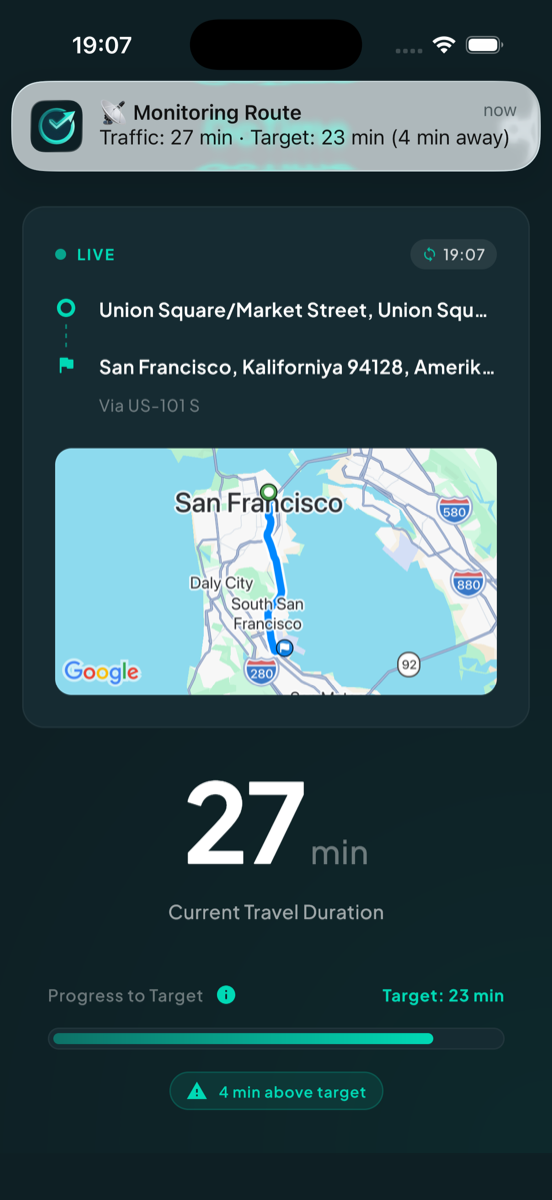
Route monitoring is most helpful when it reduces manual work. Rather than reopening a map every few minutes, use a traffic alert or route monitoring app that can keep watching the trip and notify you when conditions approach your target.
How to choose a realistic target
A target that is too optimistic may never be reached during a busy period. A target that is too generous will trigger too early to be useful. Start with your experience of the route and adjust after observing several trips.
- Use a duration you have realistically seen on that route.
- Allow a wider target when arriving on time matters more than minimizing travel time.
- Use a tighter target when your schedule is flexible and you can wait for conditions to improve.
- Review the target when the route, season, or daily schedule changes.
The best target is personal. Two drivers on the same road may make different decisions because their arrival deadlines and tolerance for waiting are different.
Common departure-timing mistakes
Leaving at the same time regardless of current conditions
A routine is convenient, but it ignores meaningful day-to-day variation. A short route check before departure can reveal whether the usual time still makes sense.
Waiting only for traffic to become “good”
Traffic may improve without becoming ideal. Use a measurable travel-time target and a latest departure time instead of an undefined idea of good traffic.
Watching traffic without a decision rule
More information does not automatically make the decision easier. Decide in advance what duration will cause you to leave and what deadline will stop you from waiting.
Ignoring the time after the drive
The route duration may not include parking, walking, building access, or preparation at the destination. Include an appropriate buffer when calculating your latest safe departure.
How GoTime supports this process
GoTime is designed around saved routes, current travel duration, target time, and notifications. Its role is not to replace turn-by-turn navigation. It helps maintain awareness before the trip begins so the user can make a clearer departure decision without repeatedly checking the same route.
Learn more in the GoTime product story, or visit the official GoTime site.